Showing posts with label mysql. Show all posts

Tuesday, February 11, 2014

ADF Entity Track Change History Attributes and MySQL Database

Hello all.
Oracle ADF can be used with other databases vendors rather than Oracle, however some out-of-the-box functionalities may not work properly and you'll find yourself looking for workarounds to make them work. Today, we are going to see how we can use the Track Change History properties (CreatedBy, CreatedOn, ModifiedBy, ModifiedOn) of a Business Components Entity when using MySQL.

What you need
JDeveloper 12c
MySQL 5.6.4 or higher

Before we start, you need to know the following:
  • In MySQL 5.5 and higher, InnoDB is the default storage engine. The benefits of this are: ACID Transactions, Referential Integrity, and Crash Recovery.
  • Previous versions of MySQL do NOT store fractional seconds (milliseconds) into columns of any temporal data type. More info on this, here.
  • From version 5.6.4, MySQL stores fractional seconds (milliseconds) into columns of any temporal data type. More info in this, here.
  • You can define how many milliseconds to store from 0 to 6.

To start, execute the following script in MySQL database:

CREATE  TABLE `Player` (
  `idPlayer` INT NOT NULL AUTO_INCREMENT ,
  `name` VARCHAR(150) NOT NULL ,
  `age` INT NOT NULL ,
  `created_by` VARCHAR(50) NULL ,
  `created_on` DATETIME(3) NULL ,
  `modified_by` VARCHAR(50) NULL ,
  `modified_on` DATETIME(3) NULL ,
  PRIMARY KEY (`idPlayer`) )
;


You can see that we are creating a table with an autoincrement primary key. We have seen before, a workaround about having autoincrement columns in MySQL to work with ADF, but we are not using it in this post. 

Also, notice that we are defining that the DATETIME columns will have 3 milliseconds. Once you have executed the script, go to File->New->Business Components From Tables and follow the wizard to create an Entity of the table Player, a default ViewObject and an Application Module. Remember to configure the SQL Platform as SQL92 and Data Type Map as Java:


JDeveloper will map the DATETIME columns as Timestamp fields in the Entity, which is fine since we want to store milliseconds:


Configure each history attribute as one of: Created On, Created By, Modified On, Modified By and notice that when you configure an attribute as a Track Change History Attribute, JDeveloper will select default values for other properties:


Once all the Track Change History Attributes are set, you can run the Application Module in order to test the functionality. However, you may find the following error when trying to commit to the database:


Current time is not available from SQL statement "select sysdate from dual".: Unknown column 'sysdate' in 'field list'...


This is happening because the Application Module tries to get the current date from the database using Oracle's statement: "select sysdate from dual", which is not valid in MySQL. In order to change that, go to your Application Module and edit the LOCAL configuration:


A pop up opens, go to the Properties section and look for a property called: jbo.sql92.DbTimeQuery


We need to change the value of that property to something that works on MySQL. There are many DATE related functions in MySQL, here we are going to use NOW(). So, change the value of the jbo.sql92.DbTimeQuery to:

select NOW() from dual


Click OK button and save your changes.

CAUTION: At the time of this writing, JDeveloper is using mysql-connector-java-commercial-5.1.22-bin.jar as the default MySQL library. However, when I tried the above configuration using that library, it didn't work because no milliseconds information were being stored into the database. The solution is to update the MySQL driver. You can find the official MySQL connector drivers at: http://dev.mysql.com/downloads/connector/j/

If you don't update the MySQL driver, you may experience the following error when trying to modify a row (this is the so called Phantom Error):


The following picture was taken when using the default MySQL library, notice that there is no milliseconds information saved into the database:


And here is the picture after using the latest MySQL connector, notice the milliseconds information:


When you have downloaded the new version of the driver, you have to remove the default MySQL library from your project and add the new jar. Go to your project Properties:


Run the Application Module again, create or modify rows and this time it should work.

That's it, with the above configuration you are now ready to use the Track Change History functionality when using MySQL database.


see ya!


References


MySQL 5.6 Reference Manual :: 12.7. Date and Time Functions. MySQL [online].
Available on Internet: http://dev.mysql.com/doc/refman/5.6/en/date-and-time-functions.html
[accessed on February 09 2014].

MySQL 5.6 Reference Manual :: 11.3.6. Fractional Seconds in Time Values. MySQL [online].
Available on Internet: http://dev.mysql.com/doc/refman/5.6/en/fractional-seconds.html
[accessed on February 09 2013].

MySQL 5.6 Reference Manual :: 14.2.1.1. InnoDB as the Default MySQL Storage Engine. MySQL [online].
Available on Internet: https://dev.mysql.com/doc/refman/5.6/en/innodb-default-se.html
[accessed on February 09 2013].

Saturday, November 23, 2013

Using MySQL autoincrement PK column in ADF Entity PK attribute

Hello all. Continuing with the ADF + MySQL workaround series, today we are going to see what we need to do in order to use MySQL PK autoincrement columns with our ADF Entities PK attributes. If we were using Oracle database, we would use the oracle.jbo.domain.DBSequence along with a sequence and a trigger in order to do that out-of-the-box.

For simplicity, we are going to modify the Java file associated to the Entity, but as a good practice, you should have your own implementation of the oracle.jbo.server.EntityImpl class and configure JDeveloper so it uses your own implementation for every new Entity in your application. Check this post for more information about that.

This is not a step by step tutorial about how to create ADF BC from tables, we'll assume that you already have your Business Components definitions.

What you need
JDeveloper 12c
MySQL 5.5+


This is the database table that we are going to use in this post:

CREATE  TABLE `test`.`Actor` (
  `id_actor` INT NOT NULL AUTO_INCREMENT ,
  `name` VARCHAR(100) NOT NULL ,
  PRIMARY KEY (`id_actor`) );

Once you have created your entities from tables, JDeveloper will map your Entity attributes against the table columns and will set some properties based on the type of column. For example, for our PK column (id_actor), JDeveloper will set the attribute as a mandatory Integer and always updatable. We need to change that because we want our PK to be updatable while new (while creating a new instance) and not mandatory (because we are reading the autoincrement value after posting to the database):


You may have several tables in your database and hence several Entities in your ADF application but not all tables may have autoincrement PK columns, so we need a way to mark or identify when the Entity's PK attribute is coming from an autoincrement column in the database. We are going to do that using Property Set, which allows us to define a collection of key/values properties and then we can associate those properties to an attribute and access them during runtime:
  1. In JDeveloper select: File-->New-->From Gallery...

  2. In the ADF Business Components select Property Set


  3. Set the name and package of the new property set:


  4. Once created, we can define the set of key/value properties and if the properties are going to be shown to the users, we can even define them in translatable mode. This is not our case, so we are going to define a non-translatable property:


  5. Set the property name as AI (for AutoIncrement) and its value as true (because attributes who use this Property Set are coming from an autoincrement column):


  6. Now that we have our Property Set ready, we can use it in our Entity PK attribute:


In order to retrieve the autoincrement value for our PK attribute, we need to override the default implementation of our Entity class (remember we do this for simplicity, but you can do better as described at the beginning of this post). We can do that by implementing a Java class for our Entity and then by overriding the EntityImpl.doDML(int, TransactionEvent) method, which is where changes are posted to database:
  1. Go to the Java section of the Entity and click on the pencil icon:


  2. In the pop up window, select Generate Entity Object Class:... and click OK:


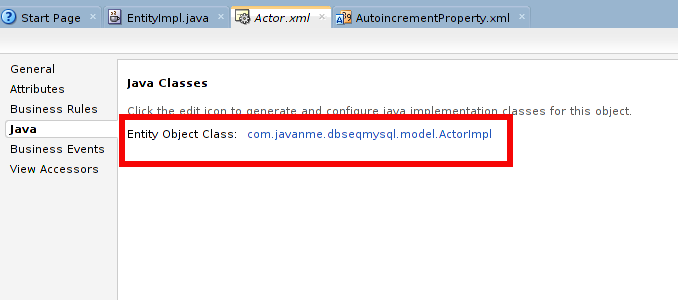
  3. The Java section of the Entity class now shows the Java file, click on the link to the Java File name:


  4. JDeveloper will open a new window with the Java code. Copy and paste the following methods:

    ...
        @Override
        protected void doDML(int i, TransactionEvent transactionEvent) {
            //got to call first to super, so the record is posted 
            //and we can then ask for the last insert id
            super.doDML(i, transactionEvent);
            
            //after the record is inserted, we can ask for the last insert id
            if (i == DML_INSERT) {
                populateAutoincrementAtt();
            }
        }
        
        /*
        * Determines if the Entity PK is marked as an autoincrement col
        * and executes a MySQL function to retrieve the last insert id
        */
        private void populateAutoincrementAtt() {
            EntityDefImpl entdef = this.getEntityDef();
            AttributeDef pk = null;
            //look for primary key with Autoincrement property set
            for (AttributeDef att : entdef.getAttributeDefs()) {
                if (att.isPrimaryKey() && (att.getProperty("AI") != null 
                    && new Boolean(att.getProperty("AI").toString()))) {
                    pk = att;
                    break;
                }
            }
            if (pk != null) {
                try (PreparedStatement stmt = 
                     this.getDBTransaction()
                         .createPreparedStatement("SELECT last_insert_id()", 1)) {
                    stmt.execute();
                    try (ResultSet rs = stmt.getResultSet()) {
                        if (rs.next()) {
                            setAttribute(pk.getName(), rs.getInt(1));
                        }
                    }
                } catch (SQLException e) {
                    e.printStackTrace();
                }
            }
        }
    ...
    

    The above code is posting changes to database and then asks whether we were inserting values. If that's the case, we need to retrieve the autoincrement value and set it in our PK attribute. Refer to the MySQL function LAST_INSERT_ID() for more information about retrieving autoincrement values.

OK, let's try out our solution. First, run your application module:


Once the Oracle ADF Model Tester tool appears, select (double click) the ActorView1 View Object, on the left panel, and click on the green plus sign icon, on the right panel,  in order to add a new Actor:


Enter a name for the Actor and press the "Save changes to the database" button (little database with the checklist icon on the toolbar):


You will notice that the autoincrement value is now set to the idActor attribute!

No need to be worried about concurrent inserts, MySQL documentation states that it is OK (check this documentation):

Using LAST_INSERT_ID() and AUTO_INCREMENT columns simultaneously from multiple clients is perfectly valid. Each client will receive the last inserted ID for the last statement that client executed.

Download the ADF project used in this post.


See ya!


References:

Vesterli E., Sten (2013). Developing Web Applications with Oracle ADF Essentials. United Kingdom: Packt Publishing Ltd.


MySQL 5.5 Reference Manual :: 12.14 Information Functions. MySQL [online].
Available on Internet: http://dev.mysql.com/doc/refman/5.5/en/information-functions.html#function_last-insert-id
[accessed on November 14 2013].


MySQL 5.5 Reference Manual :: 22.8.15.3 How to Get the Unique ID for the Last Inserted Row. MySQL [online].
Available on Internet: http://dev.mysql.com/doc/refman/5.5/en/getting-unique-id.html
[accessed on November 17 2013].

Friday, November 15, 2013

Configuring MySQL for ADF development

Hi all. Today I'm going to show you how to configure MySQL database for Oracle ADF development.

IMHO when you are using ADF with other databases rather than Oracle DB you won't be able to use the full power of Oracle ADF and sometimes you'll find yourself looking for workarounds in order to achieve some behavior that with Oracle DB you get out-of-the-box. However, if your requirement is to use MySQL then you should make some configurations in order to use it with this framework. Also, you should check the JDeveloper and ADF certification matrix in order to be sure that the version of your MySQL server is certified. Following is the certification matrix for JDeveloper 12c and ADF: 


What you need
MySQL 5.5+
JDeveloper 12c

I'm running MySQL server on Ubuntu server 12.04 64bits, but I suppose that if you are running a windows system the configuration files should be similar. Refer to the Ubuntu official documentation on how to install MySQL on Ubuntu: https://help.ubuntu.com/12.04/serverguide/mysql.html


  1. Make sure you define a password for the MySQL root user, otherwise you may experience some errors when using MySQL and JDeveloper. You can define the root password during installation, but in case that you forgot to do so, try the following from MySQL manual:
    http://dev.mysql.com/doc/refman/5.5/en/resetting-permissions.html

  2. Since we want to work with Oracle ADF, we can configure MySQL database so it behaves similar to Oracle database. We can achieve that by using the sql-mode option. From MySQL manual:
    Server SQL modes define what SQL syntax MySQL should support and what kind of data validation checks it should perform. This makes it easier to use MySQL in different environments and to use MySQL together with other database servers.
    That said, we need to edit the my.cnf file, which in ubuntu is located at:

    /etc/mysql/my.cnf

    In a Windows system, you can find the file as my.ini at {INSTALL_DIR}/MySQL/data
    Open the file and change the line that starts with sql-mode= If there is not such line, you can add it under the [mysqld] section. Either case, make sure that the line is similar to:

    sql-mode="ORACLE"

    Then, you need to restart MySQL server. In order to do that, run the following commands in a terminal (in Windows, you should use the Windows service that was created when installing MySQL):

    sudo service mysql stop
    sudo service mysql start
    

    If you want to know what configurations are done when using the value ORACLE, visit the MySQL manual: http://dev.mysql.com/doc/refman/5.5/en/server-sql-mode.html#sqlmode_oracle

  3. When creating the database connection in JDeveloper, use the MySQL driver. Notice that once you select the driver, MySQL settings panel appears asking you for information regarding to your MySQL server:


  4. Last but not least, make sure that you use the proper SQL Platform and Data Type Map. For MySQL use SQL92 as the platform and Java for the Data Type Map. You have to do this configuration for every project that will start using Business Components:


That's it for today, with these configurations your MySQL will be ready for ADF. On next posts I'll be sharing workarounds that will help you take advantage of some ADF features on MySQL.

See ya!


References:

Vesterli E., Sten (2013). Developing Web Applications with Oracle ADF Essentials. United Kingdom: Packt Publishing Ltd.


MySQL 5.5 Reference Manual :: C.5.4.1 How to Reset the Root Password. MySQL [online].
Available on Internet: http://dev.mysql.com/doc/refman/5.5/en/resetting-permissions.html
[accessed on November 14 2013].


MySQL 5.5 Reference Manual :: 5.1.7 Server SQL Modes. MySQL [online].
Available on Internet: http://dev.mysql.com/doc/refman/5.5/en/server-sql-mode.html
[accessed on November 13 2013].

Tuesday, November 5, 2013

Book Review: Developing Web Applications with Oracle ADF Essentials

Book cover from
http://www.packtpub.com
Oracle ADF is a framework for building Rich Web applications with Java which is built on top of Java EE. So if you have previous experience in building Web applications using JSF you are likely to start developing with Oracle ADF pretty fast. On the contrary, if you are just beginning with Web development, the visual and declarative development that this framework offers will let you build your applications in a fast pace.

In this post, I'll be reviewing the book "Developing Web Applications with Oracle ADF Essentials" written by Sten E. Vesterli and published by PACKT. Although this book covers the 11.1.2.4.0 version, the concepts are the same as of the latest version (12.1.2.0.0 released a couple of months ago), it is a great book to get you started with Oracle ADF Essentials. The chapters are easy to read, they follow a tutorial approach and a summary at the end. You will learn what you need in order to build a Web application using a "free software" stack: JDeveloper IDE, ADF Essentials, Glassfish application server and MySQL database. This is an introductory book, so you won't find what every single property of the framework means, but it does have advance topics such as: how to configure ADF applications to be developed as shared libraries, how to implement security for an ADF Essentials application (remember ADF security is not part of ADF Essentials), among others.

IMHO when you are using ADF Essentials with other databases rather than Oracle DB you won't be able to use the full power of ADF (or ADF Essentials) and sometimes you'll find yourself looking for workarounds in order to achieve some behavior that with Oracle DB you get out-of-the-box.

From chapters 1 to 4 you will learn the basics of building an Orace ADF Essentials application and whenever there's a different behavior for using MySQL database, you'll get a tip or note clarifying this. You will also get several useful URLs pointing you to other sources of information. The chapters are tutorial like, you will be building an application with two use cases covering the core ADF Essentials technologies: Business Components for Java (BC4J) and ADF Faces.

On chapters 5 to 8 is where you get the advance training. Building enterprise like applications requires changes in your application structure and this book teaches you how to do it and what you need to have in mind when building such applications. Another important feature is debugging and ADF has its own way to deal with it, the book shows you the way you can configure your application in order to enable debugging at different levels. I really liked that chapter 7 is about securing your ADF Essentials application but it was not only limited to using JAAS, you will learn how to configure and use the Apache Shiro security framework in order to address the lack of the security mechanism in ADF Essentials. Last but not least, you'll see how to configure ANT in order to automate your building process, this is pretty useful when you are working on big projects.

Overall, I liked the book, learned new things and from now I'll try to blog about some ADF + MySQL workarounds that I have used in my projects.

For more information about this book go to:
http://www.packtpub.com/developing-web-applications-with-oracle-adf-essentials/book

See ya!